Shopify
Published:
August 28, 2026

How to Automate Shopify Shipping with Amazon Fulfillment

WB
WebBee Team
eCommerce Specialists
How to Automate Shopify Shipping with Amazon Fulfillment

Social Share

Summarize with AI

If you are into an e-commerce business or a Shopify owner looking for an effective and smooth order fulfillment, you have come to the right place. By using the capabilities of Amazon’s wider network, Shopify sellers can access the advantages of MCF & FBA and use Amazon MCF to manage order processing, shipping, and inventory needs.                                                                                                                                                                    

In this blog, we will explore how shopify shipping works with Amazon MCF, steps to automate the process, benefits, common challenges, and more. So, let's begin and unlock the full potential of Shopify Fulfillment by Amazon MCF.

What Is Amazon Multi-Channel Fulfillment? 

Amazon's Multi-Channel Fulfillment network, enabling Amazon to pick, pack, & ship your outside orders globally utilizing branded or unbranded packaging. It smoothly connects your sales channels such as Shopify,TikTok Shop with Amazon MCF by WebBee. It is a multi-channel fulfillment connector that automates inventory, order fulfillment in real time.
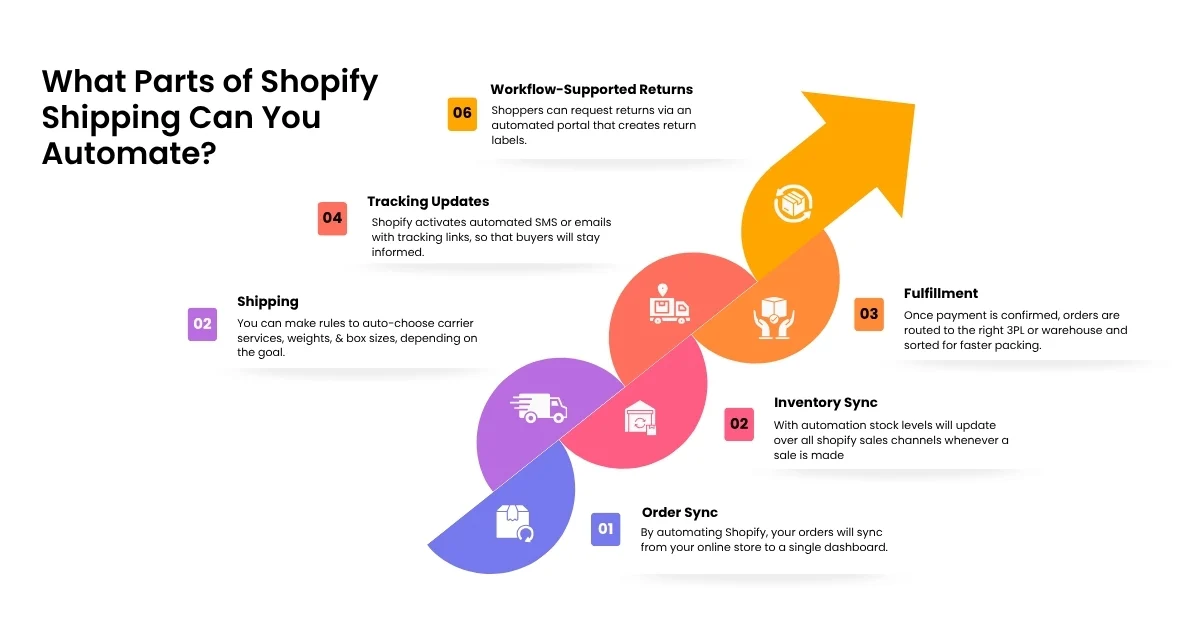
How Shopify Shipping Automation with Amazon MCF Works?

It connects your Shopify store to your Amazon Seller Central a/c using an app or Marketplace Connect. Le’ts see how the automation process works: 

  • App Installation: Download an integration software such as the Amazon MCF by WebBee app or a multi-channel shipping app from your Shopify Store. 
  • Account Connection: After installing the toll, you should log in & connect your Amazon Seller Central references to approve the connection. 
  • SKU Mapping: Now, match your Shopify SKUs to your Amazon SKUs so the system understands which items coincide.
  • Tracking Update: Amazon offers tracking details, which gives updates to users about their order. 

How to Automate Shopify Shipping with Amazon MCF? 

Step 1: Connect Shopify with Amazon MCF

  • Go to the Shopify App Store.
  • Install an integration app like Amazon MCF or a trusted partner application like Amazon MCF by WebBee.
  • Log in and connect your Amazon Seller Central a/c to qualify the connection.

Step 2: Sync Your Products & Inventory

  • Match the SKUs for your Shopify and Amazon products so you can simply keep track of the similar items.
  • Enable inventory visibility settings so inventory levels update automatically among both platforms.

Step 3: Configure Fulfillment Rules

  • Select which Shopify orders move to Amazon for shipping.
  • Set Amazon MCF as your prime fulfillment location in your Shopify settings.

Step 4: Let Amazon Process the Order

Now, Amazon gets the fulfillment request and manages everything from packing the order to shipping it to shoppers.

Step 5: Send Tracking Details Back to Shopify 

  • Amazon gives a tracking number when the order gets shipped.
  • The app will provide this data back to Shopify 
  • And Shopify automatically sends the tracking details to your buyers.

Benefits of Automating Shopify Shipping with Amazon MCF 

There are a lot of advantages of automating Shopify shipping with Amazon MCF by WebBee. Let’s look at each of these benefits one-by-one: 

  • Less manual work: With automation, orders will directly go from Shopify to Amazon without any manual interference, which will result in saving time and resources.
  • Faster shipping: From packing to picking to shipping everything will be handled by Amazon's network for quicken delivery.
  • Fewer mistakes: System-based navigation removes manual data entry mistakes at the time of order fulfillment.
  • Easy to Scale: It helps to manage high-volume sales surge effortlessly without scaling your staff.
  • Inventory Sync: Stock levels update automatically over channels to avoid overselling.
  • Clear tracking: It will share tracking details to Shopify and back to buyers in real time. 

Common Challenges When Automating Shopify MCF Fulfillment

With this automation, sellers may face challenges that can hamper their business key operations. So, it is better to know it before they create obstacles into your fulfillment workflows. 

SKU/product mismatches

Multiple sales channels might use varied item codes for the similar product. This gap will prevent automation to match the correct product. 

Inventory sync problems

Data delays among your warehouse and store will trigger stock levels to be outdated. Orders may use old numbers, which can result in critical fulfillment errors. 

Overselling

Fast sales can outpace slow inventory updates on your dashboard. You end up selling items you do not have in stock. 

Want to prevent overselling? Learn how shopify and Amazon inventory sync can help maintain accurate stock levels across channels. 

Delayed tracking updates

It might be possible that shipping data dosen't sync with your Shopify store, which can make buyers worried about their orders.   

Managing multiple sales channels

Integrating multiple platforms at once makes a tough data circle and conflicting inventory rules. A little error in a primary feed can hamper your complete fulfillment setup.

How WebBee Automates Shopify + Amazon MCF ?

By connecting your store with Amazon MCF by WebBee app, sellers can automatically send their Shopify orders to Amazon for picking, packing, & shipping in real time.  

Core Automation Features

  • Order Sync: It will automatically send new Shopify orders to Amazon MCF immediately.
  • Custom Shipping: Maps Shopify shipping options to Amazon delivery speeds and enables unbranded packaging choices. 
  • Inventory Sync: Keeps stock levels matching over both platforms to avoid selling items you don’t have.
  • Tracking & Updates: This app will automatically send tracking info to users in real time.
  • SKU Mapping: Connects multiple product codes among Shopify and Amazon, encouraging virtual bundles and more.

Conclusion

Shopify is a popular choice for online stores as it is easy to launch and allows you to manage everything from a central dashboard. It works well for businesses of any size and provides a variety of useful features, involving product management, multiple payment options, that help to simplify daily store operations.
FAQs

1. Can Shopify orders be fulfilled by Amazon?

Yes, Shopify orders can be fulfilled by Amazon using Amazon Multi-Channel Fulfillment or Buy with Prime.

2. Can Amazon MCF ship Shopify orders?

Yes, by using Amazon MCF by WerBee, you can smoothly ship orders placed on your Shopify store. 

3. How do I connect Shopify to Amazon MCF?

To connect Shopify to Amazon MCF, install an official Amazon MCF by WebBee app or 3rd-party integration app. 
Get in Touch

What to Read Next

Opening New Doors in Automation – Simple, Fast, Powerful!

In order to provide a more relevant experience for you, we use cookies to enable some website functionality. For more information, please review our Privacy Policy.

✦ Limited-Time Partner Offer
Expand Your Business to AliExpress

Sell on AliExpress and fulfill orders using your existing Amazon inventory.Whether you’re new to AliExpress or already selling there, WebBee can help you get connected and simplify fulfillment.

3 Months FREE Setup Offer valid until 24th August — don't miss it

Expand Your Business to AliExpress

Sell on AliExpress and fulfill orders using your existing Amazon inventory.