

How to Manage Inventory Sync Between Shopify and Amazon Without Overselling
WB
WebBee Team
eCommerce Specialists
Shopify and Amazon are the top sale channel choices for e-commerce businesses. Shopify sellers often integrate their store with multiple platforms to sell their products, with Amazon being the topmost platform for Shopify sellers. This integration assists Shopify merchants display their products to around two billion visitors per month.
While selling products on Shopify is certainly valuable, selling on Amazon can bring a few challenges that are faced by sellers in the modern e-commerce environment. One such challenge is syncing of inventory and orders between Shopify and Amazon.
Shopify Amazon inventory sync means keeping your stock updated across both platforms. Inventory inconsistency can cause overselling & stockouts with manual inventory management aggravating these seller pain points. To help you overcome these bottlenecks, we dive into this blog about Amazon Shopify inventory sync.
When you sell on Shopify and Amazon independently, every marketplace has its own order volume.
Assume that you have a total stock of 50 SKUs to sell on both sales channels. But if Shopify displays 50 and Amazon also reflects 50. Now if 30 units are sold on Shopify and there is a delay in inventory update on Amazon, the latter will still reflect 50 SKUs. This will result in overselling if a customer happens to place an order on Amazon during this delay.
As a Shopify seller, the selling dashboard requires you to instantly update available product stock in real time. Without this inventory sync, Amazon will still reflect 50 SKUs. This will result in overselling as the marketplace will keep taking orders till inventory is updated manually.
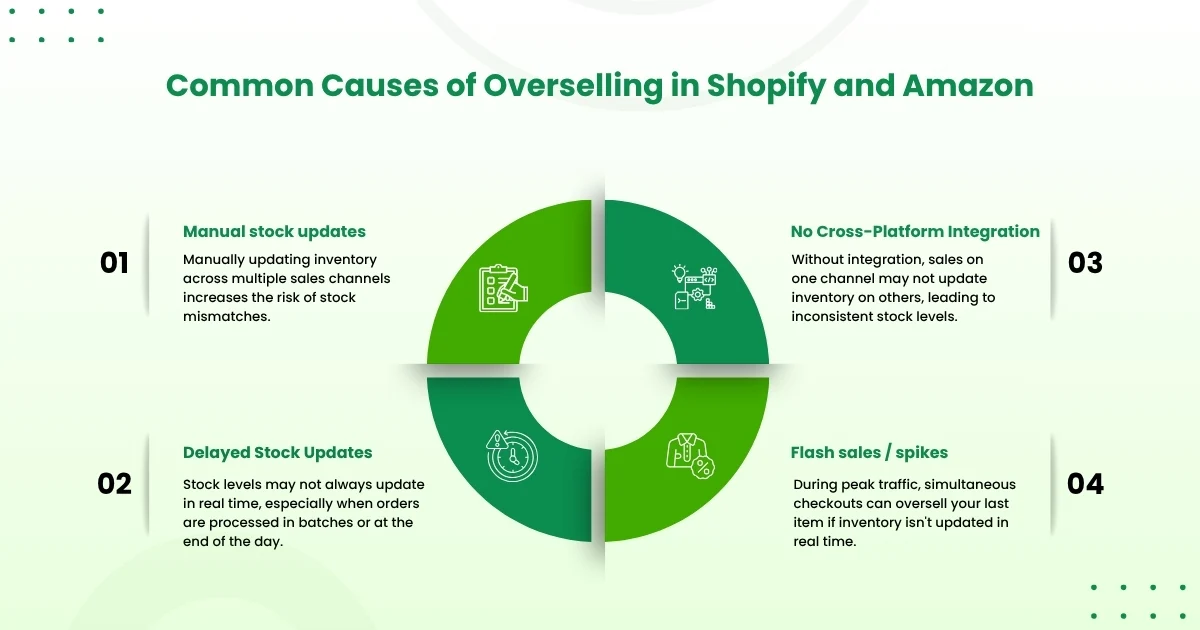
The core problem is two sales channels sharing a single pool of stock without keeping the inventory numbers in sync. Below are certain factors that have an aggravating effect:
When stockouts occur, sellers are compelled to initiate cancellations from their end and provide instant refunds. This completely wipes out their profit margins and interrupts their cash flow.
Platforms such as Amazon strictly punish pre-fulfillment cancellations of more than 2.5% of the total order volume that a business receives. This directly affects your Order Defect Rate, with immediate suspension of your listings or you may be pushed out from winning the Amazon Buy Box.
Shoppers dealing with stock out notices and cancelled orders will deal with a rise in negative public feedback which badly damages your brand reputation and hence, customer trust.
Manual management of business operations results in under utilization of manpower and resources. This hampers your company’s operational efficiency, by making repetitive entries.
Inventory that is not synchronized over both channels can shift a keen buyer into a lost user. They place an order expecting fast delivery, only to identify days later that the item is out-of-stock.
When multiple users place orders, you might not be able to fulfill them in the promised timeline, resulting in SLA breaches. When inventory levels are not upgraded across platforms in real-time, the same product can sell two times before it’s labelled as unavailable. This can result in:
Each order that is placed on Shopify or Amazon requires an inventory adjustment. Without automation, you log in to both the platforms separately and update the respective stock manually each time.
Inventory errors not only result in lost sales, but they delay all subsequent processes. Business representatives are forced to pause fulfillment to resolve incorrect orders, contact users about changes, and verify stock. Every additional step adds more time in delivering orders causing a delay in order fulfillment.
Shopify and Amazon inventory sync operates by connecting both platforms via an integration app. When a product sells on any platform, the app immediately updates the stock count on the other platform, working as a single source of truth to avoid overselling on Shopify and Amazon.
Connect your platforms using an inventory management tool or a dedicated integration software such as MapMyChannel by Webbee. This maps your listings and instantly modifies stock over all channels when an order is placed.
Create an inventory buffer stock to avoid overselling caused by inventory sync delays. This ensures that the last unit is not sold parallelly on both Amazon and Shopify.
Inventory sync won’t work if “Track quantity” is disabled on Shopify. Without this feature, inventory levels can’t be tracked or updated automatically. This means that Amazon will not record the stock fluctuations that occur on Shopify Seller Dashboard.
Automation may make mistakes either due to software bugs or physical theft. Weekly manual counts of fast-selling items catch these inaccuracies before they interrupt your fulfillment workflow.
Unstructured SKU formats result in errors, double counting, and confusion over the different sales channels that your business sells on. Making a small and standardized naming structure helps both staff and software to identify products immediately.
Relying only on real time data leaves you unprotected against sudden demand spike or unexpected delays. Maintaining a buffer stock activates early reorder signals and prevents stockouts on Shopify and Amazon.
E-commerce integrations often disconnect at the time of peak hours without sending an alert. Hence, reviewing logs on a daily basis ensures that orders and stock adjustments that failed to update, get synced immediately.
Keeping your inventory and order synced between Shopify and Amazon helps in accurate count, faster fulfillment of orders, and gaining customer’s trust. Leverage the best of the inventory management software like MapMyChannel by Webbee, to retain complete control over your brand's multi-channel inventory.
Merchants no longer have to spend a single penny and effort on tackling manual order management issues. Sellers can now redirect their productive efforts towards expanding their business through MapMyChannel by Webbee.
Yes, you can sync multiple Shopify stores with Amazon. But Amazon Seller accounts support only one store so you need to have a third party connector like Amazon MCF by Webbee & MapMyChannel by WebBee.
Yes, inventory sync is a key feature of Amazon MCF. It automatically matches your stock levels to your Amazon FBA pool and external sales channels.
Yes, you can sync fulfillment tracking automatically by utilizing direct platform integrations or 3rd-party mapping software such as Webbee.

.svg)