A buffer in inventory acts as a safety cushion that helps sellers to protect them when they get unexpected orders, even for products they don't expect to sell often. For e-commerce sellers, keeping an extra inventory prevents delays in fulfilling orders to buyers.
But, retaining too much inventory buffer can reduce revenue & increase storage costs. To figure out the right reserve stock, businesses particularly look at previous sales, order history, and inventory records. They might also use inventory management software to make right decisions.
In this blog, you will explore its meaning, common inventory challenges faced by sellers, benefits of Buffer Inventory with Amazon MCF, and why choose Amazon MCF by WebBee for inventory control. Let’s dive in!
What Is an Inventory Buffer?
It is an additional inventory or stock retain in a warehouse to safeguard a business from unforeseen supply delays, sudden surge in user demand, or shipping problems. It works as a safety net for sellers so that businesses don’t run out of products during peak sales.
Why Is Inventory Buffer Vital for Ecommerce Sellers?
Buffer in Inventory plays a key role for ecommerce sellers to prevent stockout situations & maintain the ecommerce business demand chart efficiently so the shoppers can never be unsatisfied because the product goes out of stock. It protects sellers from shipping challenges, fulfillment, shipping delays & spike in consumer buying behaviour. Using amazon mcf by webbee connector sellers can streamline multi-channel fulfillment operations smoothly.
Let’s look at its key benefits for ecommerce sellers:
Absorbs supply delays: It keeps shipping operations seamless if a shipping partner or vendor is late.
Prevents Stockouts: Reserve or plan buffer inventory stock ensures that sellers will never face situations like out of stocks during sales or getting sudden spike on demand.
Enhances Customer Loyalty: As sellers can reserve the stock, so that they can fulfill orders without delay and it will help to improve user trust, so that they will not go to your competitors.
Protects Revenue: Your operations will not get hamper with inventory buffer, which avoids lost sales and safeguard constant income.
What Are the Risk of Operating Without an Inventory Buffer?
Without a stock buffer a business goes through within lost sales, immediate stockouts, and paused production when unexpectedly demand surge or supply delays. Here are some core risks of operating without a buffer:
Costs: Purchasing last minute emergency stock from backup vendors can cost you much higher.
Stockouts: Going out of stocks immediately when a buyer purchases more items than you think of or supplier is delayed.
Production Downtime: Broken manufacturing lines as raw material is not able to arrive on time.
Lost Revenue: Missing sales when the product is not available, result in lost profit.
Customer Churn: Disappointed shoppers who get their orders late or might get canceled, result in losing trust in business.
How Does an Inventory Buffer Improve Operations?
It works as a safeguard to keep business operations running and avoid out of stock situations, making sure orders are delivered on time. Let’s explore the benefits of having buffer inventory management solution:
Stable Costs: Organizations prevent high emergency or express shipping manufacturing fees.
Happy Customers: With inventory buffers, orders will get beloved on time, which result in building strong brand goodwill.
No Stockouts: There will be no stock out due to reserve stock and sales will continue without any obstacle in case shoppers buy more than sellers expected.
Protected Supply Lines: Businesses keep operating even if raw material arrives late.
How to Enable Inventory Buffer in Amazon MCF by Webbee?
As a Shopify seller, if you are worried about overselling your products and want to configure a quantity buffer on Shopify. You can always set up such a buffer using our Amazon MCF by webbee app.
Let’s look at the steps to set up the "Out of stock buffer" in Amazon MCF Shopify.
Go to the Apps section of your Shopify store and tap on the Auto Amazon MCF by webbee app.
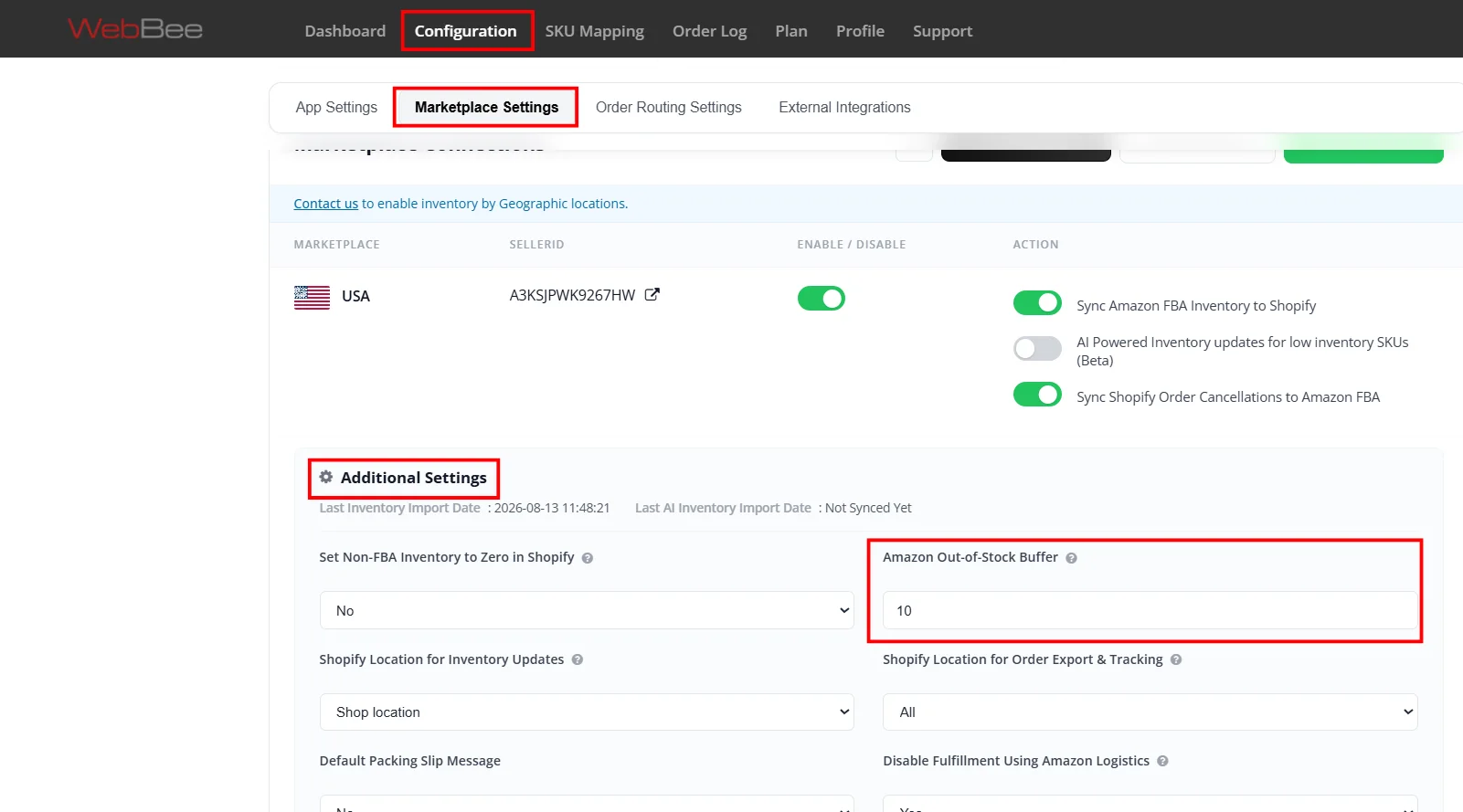
Navigate to Configuration Page > Marketplace Settings > Show Additional Settings > Inventory Sync settings > Out Of Stock Quantity Buffer On Amazon.
So, the number you put in Out Of Stock Quantity Buffer On Amazon field will reduce the inventory of your products inside Shopify.
For Example: If Amazon's inventory of a product is 100 and you set 10 within the out-of-stock buffer settings, then on Shopify, our app will automatically update the inventory to 90.
Benefits of Using Inventory Buffer with Amazon MCF By WebBee
Advantage of using an inventory buffer with Amazon MCF by WebBee Connector is that it will protect channels beyond Amazon such as TikTok or Shopify from stock-outs. Let's explore some of here:
Reduces Cancellation Difficulty: Lessens the risk of unhappy buyers and canceled orders happening due to ghost stock on your site.
Prevents Overselling: It will keep a safe stock margin so your exterior store avoids selling items before Amazon inventory stockouts.
Smooths Out Sync Delays: Immerse little timing gaps among API inventory updates over multiple e-commerce platforms.
Protects Amazon Priority: It gives priority to Amazon orders, a buffer makes sure your outside channels don’t fight for the last unit.
Best Practices for Setting an Inventory Buffer
To set an inventory buffer, sellers use actual data despite just guessing it. For that follow these best practices before setting an inventory buffer:
Track Lead-Time Fluctuation: Look for maximum vendor delays and shipping disparity despite just focusing only on average delivery times.
Use Past data: Prevent intuition; verify 12-24 months of demand changes, sales velocity, and seasonal trends.
Divide Your Inventory: Put varied buffer rules depending on SKU value, revenue margins, and sales rates despite just using a general policy.
Review & modify regularly: Sellers should keep buffers flexible and adjust them depending on market changes, vendor reliability, and more.
Frequently Asked Questions (FAQs)
1. How does inventory buffering prevent overselling?
Inventory buffer avoids overselling by keeping back a little reserve of stock.
2. Can I customize the buffer quantity in Amazon MCF by WebBee?
Yes, you can customize the buffer quantity in Amazon MCF by WebBee to avoid overselling on your store.
3. Does the inventory buffer affect Amazon FBA inventory?
Yes, an inventory buffer directly impacts your Amazon FBA performance, storage cost, and sales velocity.
In order to provide a more relevant experience for you, we use cookies to enable some website functionality. For more information, please review our Privacy Policy.
✦ Limited-Time Partner Offer
Expand Your Business to AliExpress
Sell on AliExpress and fulfill orders using your existing Amazon inventory.Whether you’re new to AliExpress or already selling there, WebBee can help you get connected and simplify fulfillment.
3 Months FREE SetupOffer valid until 30th October — don't miss it
New Users Only
Wait! Don't Miss Your Free Growth Pass
Unlock 60 Days of FREE Access
Get full access to all WebBee apps for 60 days at zero cost. See how it works with a quick demo and claim your exclusive offer before you leave.



.svg)