

How to Fix Square and Amazon MCF Sync Issues
WB
WebBee Team
eCommerce Specialists
In 2026, omnichannel is not only a competitive edge, but it’s a necessity. Businesses utilizing Square for both online and physical stores are majorly moving to Amazon MCF to offer quick and reliable shipping globally. As connecting Square to Amazon MCF is a great way to hold Amazon’s logistics for your self-dependent sales, but it comes up with tech obstacles. When orders fail to sync, it mainly reduces to a downfall in communication between the two platforms, resulting in unfilled, delayed, or remaining orders that hurt user experience.
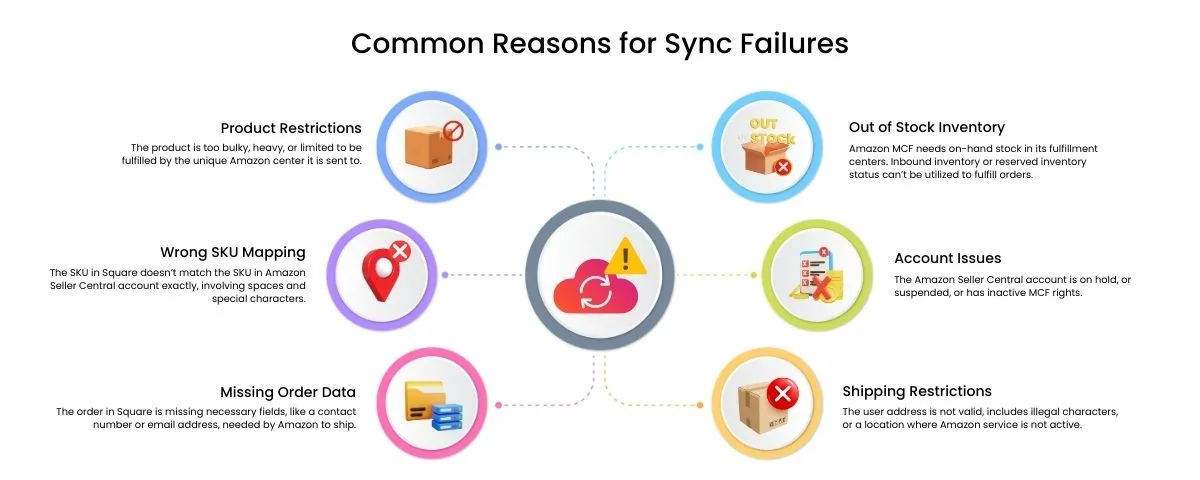
As there are few reasons for this failure involves wrong SKU mapping, inadequate inventory in delegated Amazon warehouse, or missing address information. But, these failures can be fixed by verifying your app’s error logs, validating that inventory is active on Amazon or partnering with a leading e-commerce partner like WebBee, to keep everything in the proper sequence.
In this blog, we will explore common frustration faced by sellers, reasons for sync failures, and how to quickly fix them with the right solutions. Let’s begin.
The Square Amazon MCF integration enables sellers to smooth their fulfillment process & operations together for enhanced user service & quick delivery. Sellers over the Square marketplace can utilize the wider fulfillment network of Amazon. Square sellers can increase the range of their geographical region of service. In short, sellers can sync order, inventory, & user data across multiple platforms from a single dashboard by using Amazon MCF by WebBee.
Delay deliveries, mainly caused by carrier overloads, courier issues, or bad weather, which can damage brands loyalty & trust.
Lack of real-time tracking drive to overseeing or overstocking, with discrepancy causing major operational efficiency.
Human mistakes in packing, picking, or shipping, result in wrong quantities or incorrect items being sent, leading to high return rates.
Huge volumes of Where is my order queries, returns, & refunds draining reserves and need 24 by 7, top-quality help to manage.
Related Read: Amazon MCF Features Seller Must Know
Replated Read: How to integrate Square with Amazon?
Go to your 3rd-party connector app like WebBee and analyze that the product's SKU in Square matches the Amazon FBA SKU in every way.
Verify that the products are listed as active & in-stock within the Manage FBA Inventory loop in Amazon Seller Central.
View logs or error reports in your unique integration app for failed jobs. They will frequently state ‘Invalid SKU’ or ‘Address unsupported’.
You need to ensure that for your products, the "Track quantity" choice is verified in Square to ensure stock levels are correctly proceeding to the integration.
Ensure user shipping addresses are done & free of unique characters that may cause mistakes when given to Amazon.
If you currently update SKUs or products, drive a manual sync in your integration app to restore the data connection.

Even the right integrations hit obstacles like APIs break, Orders go wrong, or Data lags. What sets apart a good system from a time drain is how well it gets over, and how certainly it tells you what is wrong.
That’s where Amazon MCF by WebBee app stands out, offering you accurate visibility, real-time sync logs, manual overrides when automation breaks and help when Amazon support is not working as it’s supposed to be functioning. With the right partner by your side, you can make your operations more efficient & error-proof.
.svg)